Build and Test Automation
These CCPi modules are built automatically from Github repository:
- Pre-Processing - https://github.com/vais-ral/CCPi-PreProcessing
- Reconstruction - https://github.com/vais-ral/CCPi-reconstruction
- Astra toolbox wrapper - https://github.com/vais-ral/CCPi-astra
- Framework - https://github.com/vais-ral/CCPi-Framework
- Framework Plugins - https://github.com/vais-ral/CCPi-FrameworkPlugins
- Regularisation Toolkit - https://github.com/vais-ral/CCPi-Regularisation-Toolkit
- Quantification - https://github.com/vais-ral/CCPi-Quantification
With following limitation:
- every commit to master branch is built and binary is uploaded into anaconda channel ccpi.
- every pull request is built, but no binaries are uploaded
- commit to non-master branch is not built
- the result of built and test process is available in on top of the github page
- version is determined from last git tag and number of commits after this tag, e.g. 0.10.3_103 means 103 commits after last tagged version 0.10.3.
- if number of commits after tagged version is 0, then this built is assumed production, this can be installed by
conda install -c ccpi ccpi-[module name]
- if number of commits after tagged version is greater than 0, then this built is labeled as dev
conda install -c ccpi/label/dev ccpi-[module-name]
Recommended setting in continuous integration
Automatic build process can be triggered by various events. The recommended events ar push and pull-request. A so called “Webhook” can be configured in Github to send a notification about an event to third party application. Jenkins (or any other CI tool) can be configured to listen to such notification and launch configured action, i.e. build process.
CCPi modules with source codes at https://github.com/vais-ral/ are configured with proprietar installation of Jenkins at https://anvil.softeng-support.ac.uk/jenkins. This service is provided for UK academics community. However, the following is recommended to be set in any Jenkins deployment for every CCPi module. In the following section, replace [module_name] with your selected ccpi module (e.g. Regularisation-Toolkit) and replace [jenkins_url] with url to jenkins instance (e.g. https://anvil.softeng-support.ac.uk/jenkins):
Production built for CCPi-[module_name]
Jenkins is pressumed to contain only “Git” and “Github” plugins. No other plugins are required.
To configure build action on push event on master branch received from Github do following in Jenkins:
Create new project by:
choose folder, New Item, Enter Item Name:CCPi-[module-name], Freestyle projectEnter these values:
- [x] Github project -> Project URL:
https://github.com/vais-ral/CCPi-[module_name]/ - [x] Restrict where this project can be run -> Label Expression
sl7(choose this to scientific linux, ubuntu or any linux based machine)

Source code management -> [x] Git ->
- Repositories, Repository URL:
https://github.com/vais-ral/CCPi-[module_name].git - Branches to build, branch specifier:
*/master - Additional Behaviours, Check out to specific local branch
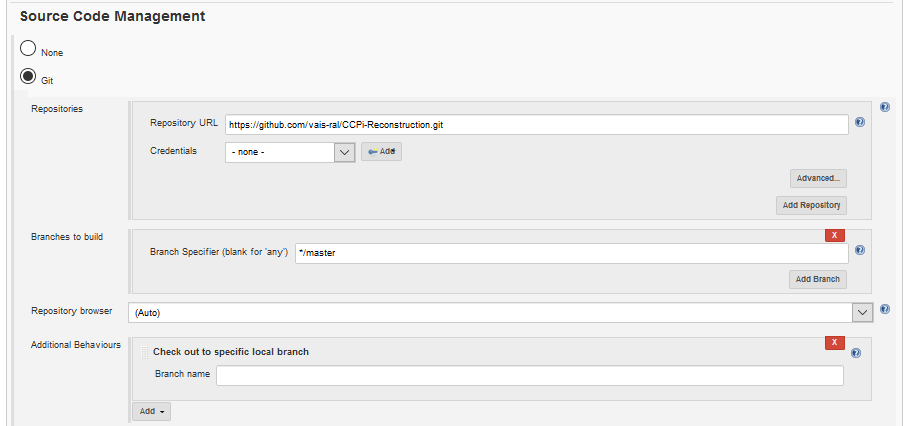
- Repositories, Repository URL:
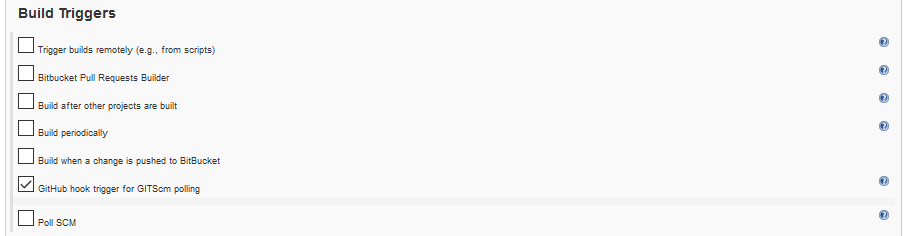
Build triggers, [x] Github hook trigger for GITScm polling
Execute shell:
module load conda
#commented version = version will be determined from git tag and number commits
# export CIL_VERSION=0.10.3
# uncomment following and specify
# export CCPI_CONDA_TOKEN=[conda token to upload to ccpi channel]
# export CCPI_PRE_BUILD=[if defined "conda build $CCPI_PRE_BUILD" is called before]
# export CCPI_BUILD_ARGS=[optional args to be appended to main build process]
#build and upload
bash -xe <(curl -L https://raw.githubusercontent.com/vais-ral/CCPi-VirtualMachine/master/scripts/jenkins-build.sh)
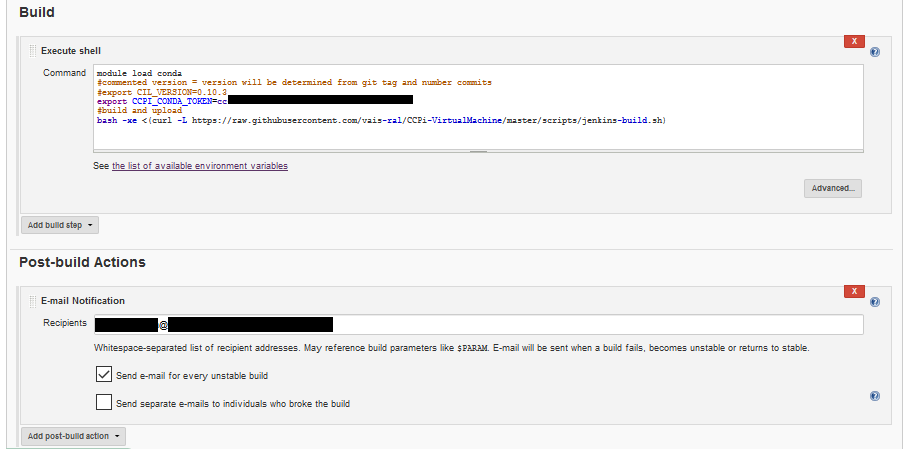
(Optionally) specify post build action like email notification etc.
- [x] Github project -> Project URL:
Note
Note that repository url ends with .git suffix. Otherwise notification from github are ignored.
Note
Check out to specific local branch settings ensures that branch is identified e.g. as refs/heads/master. This is used to determine whether and how to upload binaries. master branch are uploaded, non-master branch (pull requests) are built only.
Note
bash <(curl …) calls universal script, see Section bellow.
- In Github project -> Settings -> Webhooks
- Add new Webhook
- Payload URL:
[jenkins_url]/github-webhook/ - Which events would you like to trigger: [x] Just push event.

Development built for pull request on CCPi-[module_name]
To configure build action on pull-request event on any branch received from Github do following in Jenkins:
Create new project by:
choose folder, New Item, Enter Item Name:CCPi-[module-name], Freestyle projectEnter these values:
[x] Github project -> Project URL:
https://github.com/vais-ral/CCPi-[module_name]/[x] Restrict where this project can be run -> Label Expression
sl7(choose this to scientific linux, ubuntu or any linux based machine)Source code management -> [x] Git ->
- Repositories, Repository URL:
https://github.com/vais-ral/CCPi-[module_name].git - Advanced:
- Name:
origin - Refspec:
+refs/pull/*:refs/remotes/origin/pr/*
- Name:
- Branches to build, branch specifier:
** - Additional Behaviours:
- Advanced clone behaviours:
- Fetch tags [x]
- Honor refspec on initial clone [x]
- Check out to specific local branch
- Repositories, Repository URL:
Build triggers, [x] Poll SCM
Execute shell:
module load conda
#commented version = version will be determined from git tag and number commits
# export CIL_VERSION=0.10.3
# uncomment following and specify
# export CCPI_CONDA_TOKEN=[conda token to upload to ccpi channel]
# export CCPI_PRE_BUILD=[if defined "conda build $CCPI_PRE_BUILD" is called before]
# export CCPI_BUILD_ARGS=[optional args to be appended to main build process]
#build and upload
bash <(curl -L https://raw.githubusercontent.com/vais-ral/CCPi-VirtualMachine/master/scripts/jenkins-build.sh)
- In Github project -> Settings -> Webhooks
- Add new Webhook
- Payload URL:
[jenkins_url]/git/notifyCommit?url=http://github.com/vais-ral/CCPi-[module_name].git - Which events would you like to trigger:
- [x] Let me select individual events
- [x] Pull request
Universal built script
The jenkins-build.sh at https://raw.githubusercontent.com/vais-ral/CCPi-VirtualMachine/master/scripts/jenkins-build.sh is universal script to build CCPi module libraries based on conda recipe in relative path at Wrappers/Python/conda-recipe.
Variants are supported (combination of python version and dependent libraries). It expects that conda recipe is defined in path Wrapper/Python relative to CCPi-[module].
Typical usage:
#commented version = version will be determined from git tag and number commits
# export CIL_VERSION=0.10.3
# uncomment following and specify
# export CCPI_CONDA_TOKEN=[conda token to upload to ccpi channel]
# export CCPI_PRE_BUILD=[if defined "conda build $CCPI_PRE_BUILD" is called before]
# export CCPI_BUILD_ARGS=[optional args to be appended to main build process]
#build and upload
bash -xe <(curl -L https://raw.githubusercontent.com/vais-ral/CCPi-VirtualMachine/master/scripts/jenkins-build.sh)
- These environment variables can be specified:
- CCPI_PRE_BUILD - if defined, then “conda build $PREBUILD” is performed before conda build, binaries will be uploaded to anaconda channel together with main build
- CCPI_POST_BUILD - if defined, then “conda build $CCPI_POST_BUILD” is performed after conda build, binaries will be uploaded to anaconda channel together with main build
- CCPI_BUILD_ARGS - passed to conda build as conda build Wrappers/Python/conda-recipe “$CCPI_BUILD_ARGS”, e.g. CCPI_BUILD_ARGS=”-c ccpi -c conda-forge”;
- CIL_VERSION - version of this build, it will be used to label it within multiple places during build. If CIL_VERSION is not expliticly defined, then version is determined from git describe –tags
- Note that version in CIL_VERSION or determined from git tag contains information about last tag and number of commits after it. Thus e.g. last tag is 0.10.4 and current commit is 3 after this tag, then version is 0.10.4_3
- If the version is release (no number after ‘_’), anaconda upload is production
- If the version is not release (number of commits after ‘_’) then anaconda upload is labeled as ‘dev’
- some commit can be explicitly tagged including ‘_’ char and something after, then it is considered as ‘dev’ version
- CCPI_CONDA_TOKEN - token to upload binary builds to anaconda - it detects the branch under which the CCPi is build, master is uploaded to anaconda channel, non-master branch isn’t
Optional Github and Anaconda information badges
In order to have feedback status of the build process on github or any other third party page, you may put the following code, which shows the image of the build status and links to the build status page where more information can be obtained in order to investigate a build failure.
Note
Replace [CCPi-module] by a selected module, e.g. CCPi-Reconstruction. Replace [conda-module] by module name in conda - it may differ, thus e.g ccpi-reconstruction.